

AI Catchup for Chat
Overview
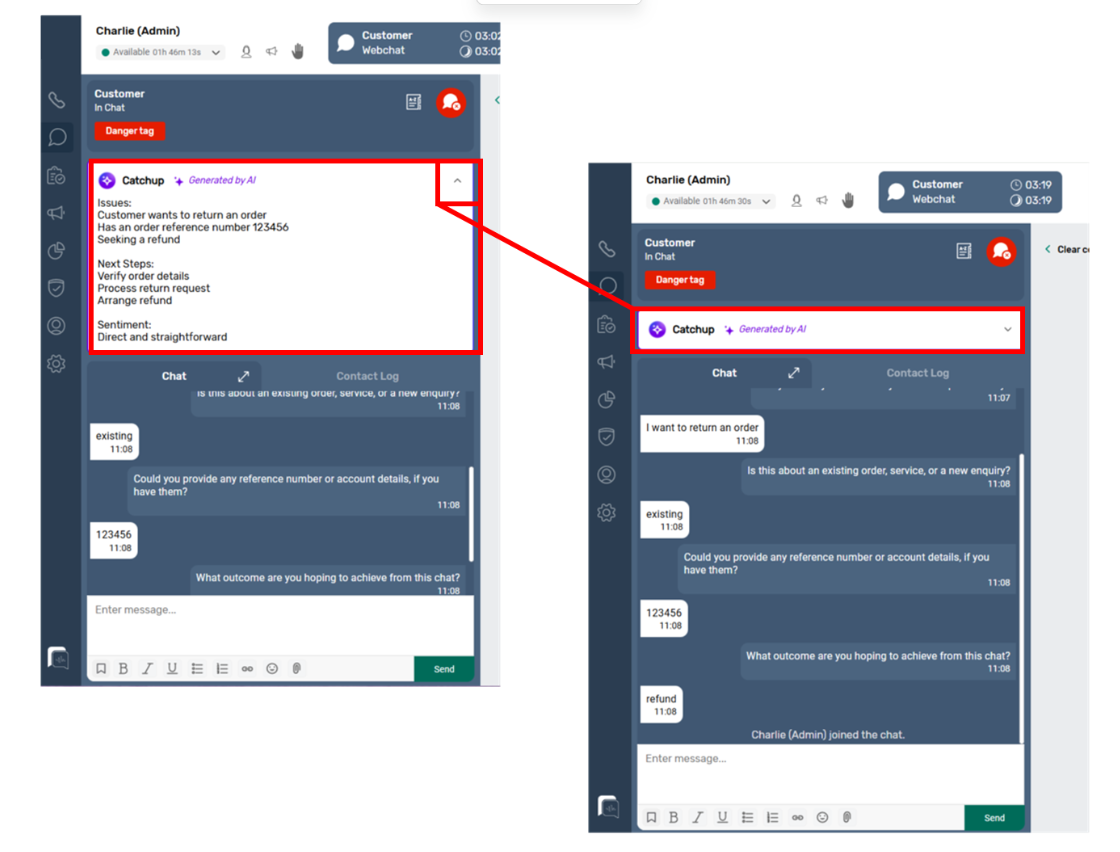
AI Catch-Up for Chat automatically generates clear, concise summaries of inbound chat conversations within SmartAgent.
Whether a chat interaction is brief or part of a longer exchange, AI Catch-Up filters out unnecessary detail and highlights the key points. This enables agents to quickly understand the conversation context at a glance — without needing to read through the entire transcript.
The result is faster responses, more confident decision-making, and a smoother customer experience.
Where You Can View AI Summaries
AI Catch-Up summaries for chat are available in the following areas of SmartAgent:
- Work Tray
- Work Tray Pop-Out
- Contact Search
- Contact History
Summaries are displayed alongside the chat interaction, providing instant context before the agent engages or when reviewing past conversations.
Key Benefits
Improved Productivity
Agents can immediately understand the purpose and outcome of a chat without reading the full transcript, helping to reduce handling time and improve efficiency.
Greater Accuracy
AI highlights the most important details from the conversation, reducing the risk of missing key information or misunderstanding customer intent.
Controlled Visibility
Access to AI summaries is managed through existing SmartAgent user permissions, giving administrators full control over who can view and use the feature.
Permissions
AI summaries are only visible to users with the appropriate access rights. If a user does not have permission, the summary will not be displayed.
Enabling AI Catch-Up for Chat
AI Catch-Up is an optional feature
To enable this capability within your SmartAgent environment, please speak to your Customer Advocate, who will guide you through activation and configuration.