

v3.5 Release Notes
| UAT Release Date | 5th March 2026 |
|---|
We’re pleased to introduce SmartAgent v3.5 which marks a milestone as we are now fully compliant with the WCAG 2.2AA accessibility standard, underlining our continued commitment to making software work for everyone.
This release also delivers some exciting new functionality from our AI roadmap and enhanced Zendesk CRM connectivity.
What’s New?
AI After-Contact Work for Email (Pilot Release)
Agents typically spend between 30 seconds and 7 minutes filling out the After-Contact Work (ACW) Form on each contact they handle. This is a process which is tedious and can be prone to mistakes. AI After-Contact Work removes this overhead entirely with forms automatically filled out in the background based on the customer’s request, the agent’s response and any other relevant information available such as cases created.
It is designed to save agent time, and improve accuracy of post-contact summarisation/disposition for reporting, analysis and follow up actions.
Benefits:
- Faster response times: ACW forms are completed automatically, allowing agents to move onto the next interaction sooner.
- Improved accuracy: AI consistently tags, categorises, and summarises contacts - reducing manual errors and improving data quality.
- Reduced administrative overhead: Agents spend less time completing forms and more time supporting customers.
- Better reporting and analytics: AI outputs are captured as attributes in exactly the same way as standard ACW forms, enabling richer reporting, automation, and insight across contact types.
AI After-Contact Work utilises AI Action Flows in SmartAgent, meaning the feature can be customised to handle business cases specific to your organisation or industry. It’s also possible to enhance the Generative AI output with insights from external data sources, contact summaries, and more detailed use cases.
How to enable this feature
📆 This feature is in Pilot release, please fill out this form and we will be in touch.
CRM Companion Integration with Zendesk (Pilot Release)
SmartAgent now integrates with Zendesk through the CRM Companion app, enabling agents to access SmartAgent’s full capabilities alongside their Zendesk workspace.
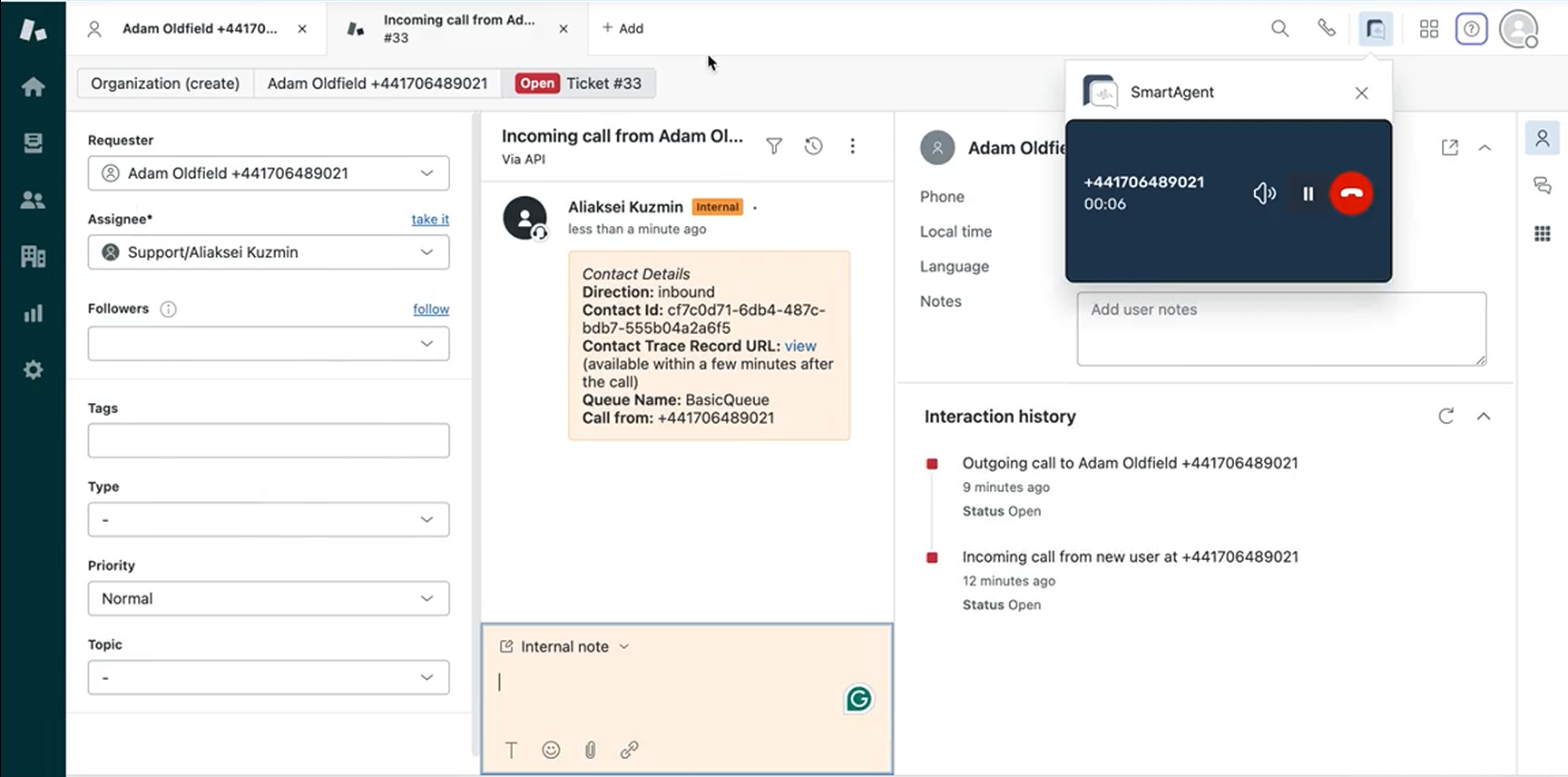
- Click-to-call from within Zendesk
- Screenpop customer records in Zendesk as calls are answered
- See active call details and access SmartAgent call controls within Zendesk
- Update customer records in Zendesk with calls handled
The CRM Companion integration enhances agent productivity by bringing SmartAgent’s contact controls directly into the Zendesk interface, eliminating context switching and enabling faster customer service responses.
How to enable this feature
📆 This feature is in Pilot release, please fill out this form and we will be in touch.
Other Improvements
Fully Zoomable Interface (General Release)
As part of our commitment to accessibility, the application can now be zoomed while retaining full functionality, meaning agents who are more comfortable with larger text can use the application more easily. This is key to ensuring the application can be used by agents with visual impairments.
This is in general release and will automatically work if the agent chooses to zoom their browser.
This completes our current roadmap to the SmartAgent application being fully WCAG 2.2 AA compliant. You can read more in our updated Accessibility Statement.
Bug Fixes
| Area | Description |
|---|---|
| Email Attachments | We have fixed a bug when multiple attachments were received, the number of attachments on an email was being displayed incorrectly. |
| Outbound Email | We have fixed an issue where in some cases the outbound email page became unresponsive when content had been copied and pasted in. |
This release also includes several general improvements and background fixes to further enhance platform stability and performance.
Changes since first published
March 12, 2026
Patch release 3.5.1
Extend ACW
The Extend ACW option was no longer visible during wrap for some clients due to a configuration that now defaults to hidden when not explicitly set. This has been addressed, restoring visibility of the button where intended.
**International email **
Agents were experiencing UI resets when sending emails to international addresses. This issue has now been resolved ensuring normal operation.